


Video Teleprompter - Evelize
4.757.00 Reviews
App Specs
- Version
- 1.35
- Updated On
- License
- Free
- Downloads
- 10,000+
- Developer
- Vectora Ltd
- Categories
- Video Players & Editors
- Platform
- Android
Screenshots
 Analysis by AppCompare
My first practical test with a phone teleprompter is rarely about the script itself; it is about whether I can get a natural-looking take without turning setup into another project. Video Teleprompter - Evelize is aimed at that small but familiar problem: keeping your words close to the camera while you record, then making basic edits before sharing. I find that approach useful for short explainers, class updates, product demonstrations, and personal messages where a forgotten sentence can mean starting over.
Where a simple recording plan can get stuck
The biggest hurdle with this kind of app is not necessarily learning the controls. It is preparing text that sounds like speech. A paragraph copied straight from a document may look tidy but can be awkward to read aloud, especially when the next line is long or full of clauses. I get better results by turning the script into short thought-sized lines, adding pauses where I would naturally breathe, and reading it once before recording.
That preparation matters because a scrolling prompt can keep moving while your attention is on the lens. If the pace is too quick, you may rush; if it is too slow, your eyes can linger on the words and make the delivery feel stiff. The useful goal is not to read every word perfectly. I treat the script as a guide, then leave room for a natural expression or brief pause rather than trying to sound like I am reciting a page.
It also helps to make a short test clip before recording the full message. A few seconds can reveal whether the text is easy to follow, whether your gaze looks close enough to the camera, and whether the framing leaves you comfortable. That small check is more useful than trying to fix an entire recording after discovering that the setup felt awkward.
Setup checks that make recording easier
First off, the setup is a breeze. I downloaded it on my iPhone (it’s available on Android too), and within minutes, I was up and running. The app welcomes you with a simple and intuitive interface. No need to dig around for tutorials because everything is right where you’d expect it to be.
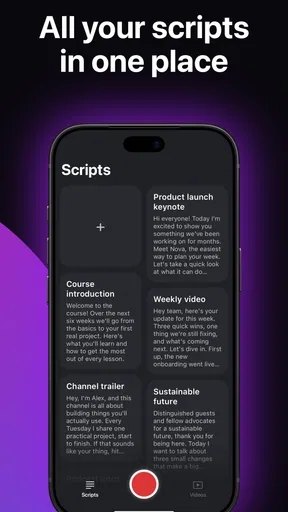
One of the standout features is the ability to import scripts straight from Google Drive or Dropbox. I’ve often typed out my scripts on my computer, and being able to seamlessly transfer them to my phone is a game changer. No more copying and pasting into notes apps!
Before relying on an imported script for an important take, I would open it and check the opening and closing lines, the line breaks, and any names or figures that are easy to stumble over. Even a good cloud handoff does not replace a quick read-through on the device where you will record. If a document looks crowded on the phone, editing the wording into shorter spoken phrases can make the prompt feel calmer to follow.
Worth Reading Before You Choose

Flipboard Shows What News Apps Must Do Beyond the Feed

Switching to Android Auto Means Rethinking Your Driving Routine

Google Calendar Makes a Crowded Week Easier to Manage

Ludo King Makes the Most of the Minutes Between Plans

Baby Panda World Brings Quick Play to Modern Phones, but Its Game Library Feels Busy

ESPN’s Live Game View Makes Following Close Games Easier
Positioning is another simple but often overlooked check. The closer the text appears to the camera’s line of sight, the less your eyes need to travel away from the lens. I would set the phone at the height I plan to use, sit or stand in place, and say a few lines while watching the playback. This is especially helpful for a work update or lesson where the aim is direct, comfortable delivery rather than a highly produced studio look.
Using the teleprompter and editor in a real workflow
I look at this part of the workflow as the point where prompting and editing need to work together without making a short video feel overproduced. I would use the editor for straightforward cleanup, then watch the clip from beginning to end to check that the cuts still sound natural. That distinction helps clarify when a quick in-app finish is enough and when a more specialized editing tool makes better sense.
Performance and Features
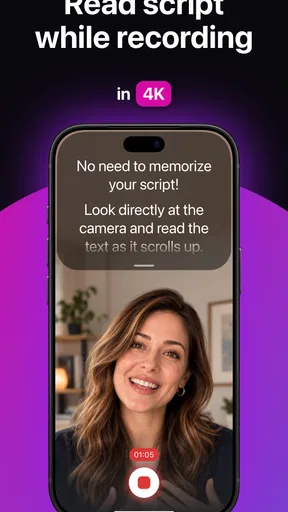
Now, let’s talk about performance. The scrolling text is smooth as butter. You can adjust the speed with just a swipe, ensuring you never miss a beat. I remember being amazed by how easy it was to maintain eye contact with the camera while reading my script. It’s like having a professional teleprompter setup without the hefty price tag.
Another cool feature is the adjustable text size and color. Whether you’re recording in bright sunlight or a dimly lit room, you can tweak the settings to ensure everything is crystal clear. This is especially handy when you’re on the go and don’t have control over the lighting conditions.
For a more dependable take, I would tune the text size before changing the scroll pace. Larger text can make each glance quicker to read, while a comfortable speed gives you time to speak without racing the prompt. If you are filming outdoors, check for glare and reposition yourself before assuming the text is too small; changing the display setting may help, but light bouncing off a screen can still be distracting.
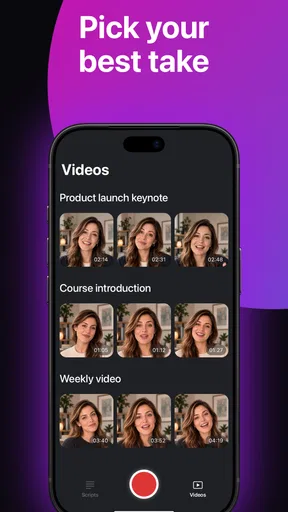
A useful everyday workflow is to keep one script for the full message and mark the places where you can pause or restart cleanly. If a sentence goes wrong, stop, return to a clear point, and deliver that section again instead of trying to rescue the line while the prompt continues. That gives you a more manageable set of takes to review and makes quick trimming less fiddly later.
When a handoff or edit needs a second look
One thing I absolutely love about Video Teleprompter - Evelize is its integration with social media platforms. After recording, you can directly upload your videos to YouTube, Instagram, or Facebook. This streamlines the whole process, saving you time and effort. I found myself posting more frequently because of this hassle-free feature.
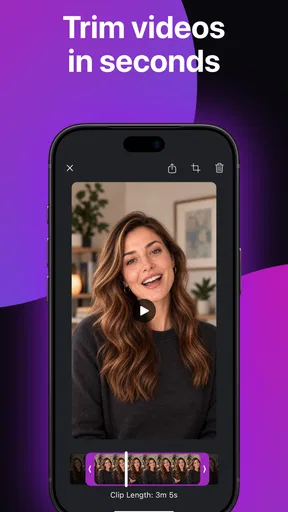
Plus, let’s not forget about the editing tools. They might not replace a full-fledged video editor, but for quick trims and tweaks, they’re more than sufficient. I’ve often used them to cut out bloopers or awkward pauses before sharing my content.
I still give the finished clip a complete watch before posting. A quick trim can remove a false start, but it is worth checking that the cut does not remove the breath or transition that makes the next sentence feel natural. For captions, detailed color work, layered footage, or a more involved soundtrack, I would move to a dedicated editor rather than expecting a teleprompter app’s built-in tools to handle every stage of production.
If a script does not appear after importing, I would first check that I am opening the intended file in the connected cloud service, then try opening it again from the app. If playback or a transfer seems interrupted, I would return to the script, verify the text is still available, and make a short test recording before repeating the whole session. These are ordinary recovery steps, not a guarantee that every issue has the same cause.
When another tool is the better choice
Compared with reading from a notes app beside the camera, a scrolling prompt can reduce the need to tap or manually move through the script while recording. Compared with a separate camera rig and dedicated teleprompter hardware, a phone-based approach is easier to carry and less involved for a quick solo video. The trade-off is that a phone screen and lightweight editing tools are not the same as a larger studio setup or a full post-production workflow.
That distinction matters if your content depends on multiple camera angles, precise edits, or a carefully staged presentation. A dedicated editor is the better place for detailed finishing, while a separate teleprompter setup may suit someone who regularly records longer pieces and wants a larger display. I would skip this app if you rarely use a script, prefer spontaneous takes, or need advanced editing more than help delivering lines.
For a realistic use case, imagine recording a short weekly update at home before work. I would draft the message on a computer, import it from Google Drive or Dropbox, shorten the lines that sound formal, set the phone at eye level, and record a brief test. After adjusting the pace, I could deliver the update in sections, trim a stumble, watch the result once, and share it. That is where the combination of prompting and quick editing feels practical: it keeps a modest task from sprawling across several apps.
People often wonder whether they need a polished script to benefit from a teleprompter. I do not think so; a few bullet points rewritten as conversational sentences can be enough, especially for a tutorial or announcement. They may also wonder whether it replaces a video editor. In my experience, it is better viewed as a way to help capture a usable take and make basic corrections, not as a substitute for tools built for detailed editing.
For someone deciding whether to try it, the cost is another useful part of the picture. The app is free to install, though it includes in-app purchases ranging from $2.99 to $149.99 per item. I would start with the free experience and decide whether the workflow suits my recording habits before spending anything. Its age rating is Everyone, and it is a video-player and editing app from Vectora Ltd; it has a 4.6 average from over 400 ratings and more than 10,000 installs. Version 1.28 is listed for devices running Android 7.0 or later.
Final Thoughts
To wrap it up, Video Teleprompter - Evelize is a fantastic tool for anyone looking to elevate their video content. Whether you’re a seasoned vlogger or just dipping your toes into the world of video, this app offers a robust set of features to make the process smoother and more enjoyable.
If you’re like me and often find yourself needing a reliable teleprompter on the go, give this app a shot. It’s like having a confident, steady hand guiding you through your lines, ensuring you always put your best foot forward. So go ahead, download it, and let your creativity shine!
My more measured recommendation is to treat it as a practical recording companion, not an all-in-one production studio. I would choose it for scripted clips, repeated updates, and messages where a steady delivery matters more than elaborate effects. If your priority is spontaneous filming, advanced post-production, or a large on-camera display, another approach will fit better. For the person who wants to prepare a script, speak to the lens with fewer restarts, and make a quick cleanup before sharing, this app offers a sensible place to begin.
Pros
- User-friendly interface for quick setup.
- Seamless integration with camera apps.
- Customizable text speed and font size.
- Supports multiple languages for scripts.
- Cloud sync for accessing scripts anywhere.
Cons
- Requires premium for full feature access.
- Limited free version functionality.
- Occasional lag on older devices.
- No offline script saving option.
- Subscription model may deter casual users.
FAQs for Video Teleprompter - Evelize
What is Video Teleprompter - Evelize and how does it work?
Video Teleprompter - Evelize is an app designed for content creators and presenters to read scripts while recording videos. It displays scrolling text on your device’s screen, allowing you to maintain eye contact with the camera. This feature is especially useful for vloggers, educators, and marketers who need to present information clearly and confidently.
Is Video Teleprompter - Evelize compatible with all devices?
Video Teleprompter - Evelize is available for both Android and iOS platforms. However, the compatibility may vary depending on your device's model and operating system version. It's recommended to check the app store for specific device requirements to ensure optimal performance.
Does Video Teleprompter - Evelize offer customizable settings?
Yes, Video Teleprompter - Evelize offers various customizable settings. Users can adjust the text size, scroll speed, and even the background color to suit their preferences. This flexibility allows for a more personalized and comfortable user experience, which is crucial for delivering effective presentations.
Are there any in-app purchases or subscriptions required?
While Video Teleprompter - Evelize may be available as a free download, it often includes in-app purchases or subscription options to unlock advanced features. These might include features like script importing, video exporting without watermarks, or additional customization tools. It's advisable to review these options if you plan to use the app extensively.
What are the main benefits of using Video Teleprompter - Evelize?
The primary benefits of using Video Teleprompter - Evelize include improved presentation delivery, enhanced video quality, and increased efficiency in content creation. By allowing users to maintain eye contact and follow a script seamlessly, it helps in producing professional-looking videos that engage viewers effectively.


